I’m a native speaker of Polish. But I’m also a developer, so most of my computers are set to English language (for ease of searching the Web when something breaks) with Polish formats and keyboard layouts (so my dates are 08/11, my hours are 13:05 and I can type zażółć gęślą jaźń whenever I want to). Now I’ve added a third language to the mix.
I’m turning Japanese
This all started with me deciding on a fun goal for myself, at least for the next little while: instead of learning yet another new programming language, why not an actual language? I already do well with English and I can hold my own in Spanish (though perhaps not a deep conversation). But with these I’ve had a series of unfair advantages:
- My parents had the foresight (and means) to get me tutored in English from age 6,
- I was born after the democratic transformation in Poland, so I was free to immerse myself in Western (English-language) culture,
- I had free access to the internet through a PC of my own from about age 8,
- I took Spanish in school so I was forced to learn enough to pass my classes, and
- Spanish is dead easy to learn anyway.
How about something actually challenging? Like something from the list of hardest languages to learn for a change? I could of course go straight for Mandarin Chinese, but I did want some return on the time and effort. And I have very little motivation to learn Chinese: I’m not that interested in Chinese culture (nothing against it, just not my cup of tea), and most things I would use Chinese for - which is shopping - are all localized by now.
On the other hand, I’m deeply interested in Japanese culture. And while the more mainstream examples of media from over there are available translated - either oficially or by fans - some of the more niche content isn’t. And when I’m talking about media, I mean manga and anime. I’m a nerd, I’m fully aware, put down the pitchforks.
So… Japanese it is.
Ha ha, I can’t draw
A big part of learning a language is - at least for me - being able to look up words that I come upon in things I learn from. I also want to not only read, but also write Japanese - most of it by hand for now, so I can get it into my muscles, but at least some input has to be on a computer.
I briefly experimented with KanjiPad. It’s supposed to work like this: you draw your best approximation of a character in a box, and it uses handwriting recognition and a few more tricks to give you the actual character for it. There are at least two big problems with this:
- in my experience, it does much better for kanji (the Chinese characters used to represent meaning) than for kana (the two phonetic syllabaries), and
- I can’t draw with my mouse for beans.
Not to mention this does nothing for my muscle memory anyway: I won’t learn the proper stroke order, sizing, spacing etc by scribbling lines with my mouse.
Then I started wondering how do actual Japanese people deal with this? Do Japanese keyboards exist?
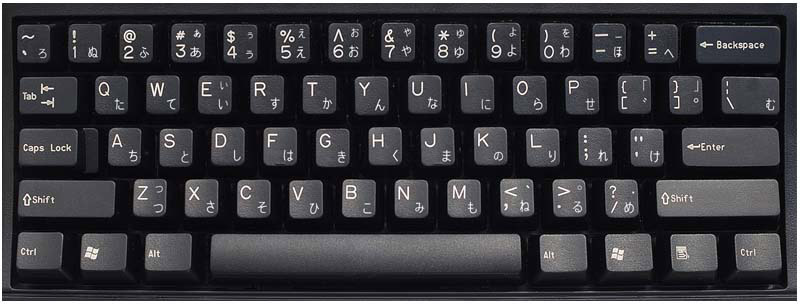
Oh. Yeah, I suppose this makes sense. But this is still not great - for one, the placement of characters on this layout has about as much sense as QWERTY: I suppose they’re placed by their commonness, but they are completely unrelated to the Roman characters on the same keys. Effectively this would just mean learning a third mapping between sounds and characters. Not fun, not great.
Anthy: all-in-one package
Then I found out about Anthy. I’d love to actually credit the source - I’ve got a funny feeling it was a random find on one of the Stack Exchange sites - but I can’t remember not find it again.
Anyway, Anthy does something magic. It lets me type in the sounds I hear the syllables in the word make as Roman characters, and converts them to either hiragana or katakana, depending on the setting. It also registers a few keyboard shortcuts, so I can have Roman characters converted to hiragana, katakana, or not converted at all.
For example: in “Roman mode”, it just comes out “osake”. In hiragana mode, it comes out おさけ。In “Roman mode”, it comes out “chari”. In katakana mode, it comes out チャリ. Magic.
And the magic doesn’t stop there. If I type the characters for “kame”, so “かめ”, and press space, I get a dropdown allowing conversion to “亀”, so the kanji for “turtle”. That’s even more magical, and will perhaps come in handy once I get anywhere close to learning kanji.
This all installed in Ubuntu as an alternate input method, so I can use Alt+Super+Backspace to move between Polish keyboard and Anthy. It makes for a nice, if ocasionally confusing experience (e.g. if I’m trying to input my password having left it in hiragana mode and forgotten).
But you said “learning on Ubuntu”, too
Not much of that is happening yet 😳 I wish it was, but I ran into a few microphone-related issues trying to run Duolingo on Chromium - and it’s my primary learning tool. I’ll probably circle back to that eventually, but for now the iOS experience from Duolingo is quite sufficient for my (scant) level. And there are other things like calligraphy training which are not well suited to being done on a computer.
One of the things I’m looking forward to somewhere down the line is KDrill, which is a kanji flashcard-like program. This will probably come in handy when I’m into the kanji stage of learning and physical flashcards are no longer feasible.